BLEED
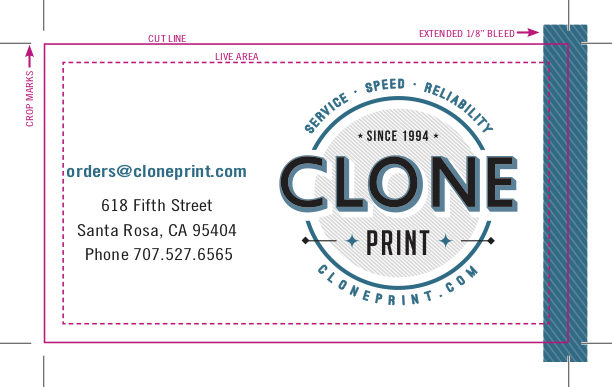
Artwork (graphics, photos or text) that is printed to the edge of the finished piece. As presses cannot print to the edge on a sheet of media, any artwork that is required to go to the edge must be extended beyond the cut edge by 1/8″, and crop marks should be added at the corners (please do not make the crop marks touch each other. They should be set back from the corner between 1/16″ and 1/8″). See photo below for reference.
LIVE AREA
The “safe zone” on a printed piece in which you place all designed info you do not want to be cut off. We designate the Live Area as anything set within 3/16″ inside of the cut edge. Please consider that even when designing for a “bleed” (see above), you should not place any important information (phone numbers, for example) right up to the bleed edge. See photo above for reference.
CROP MARKS
Marks printed at the corners to show where the finished piece should be trimmed. Only required with non-standard page sizes, or bleed edges. When adding crop marks, please make sure not to allow them to touch the corner. They should remain between 1/16″ to 1/8″ apart from each other at the corners.
STANDARD PAGES SIZES
We base all of our printing on the ANSI standard page designations: Letter: (8.5″ x 11″), Legal:(8.5″ x 14″), Tabloid (or “ledger”): 11″ x 17″, and Super Tabloid: (officially known as “Arch B”): 12″ x 18″. The largest sheet size we run through our in-house digital presses is 13″ x 19.25″. On our oversize inkjet printer, we can run custom sized stocks 60″ wide.
RESOLUTION
The measurement used to define the quality of a print or display image on a monitor. Simply put, a printer’s resolution is measured in dots per inch (dpi), while the image displayed on a monitor is measured in pixels per inch (or ppi).
PPI
The PPI of your image will affect the print size of your photo and will affect the quality of the output. If you enlarge a raster image beyond the recommended ratio, there will be too few pixels per inch in the output. The pixels in the image will be too large and will result in a pixelated image (jagged edges and poor resolution). The optimum PPI for your image this will depend on the size of the print. If you have a large print that you are looking at from a distance you can get away with a lower PPI and still have the image look fine.
A 100-pixel x 100-pixel image printed as a 1″ square has a print resolution of 100 ppi. The same 100-pixel x 100-pixel image printed as a 10″ x 10″ square has a printed resolution of 10 ppi.
The optimum resolution at which to create a raster graphic is 300 ppi at the final size the image will be printed. A letter size page (8.5″ x 11″) at 300 ppi would have a measurement of 2550 pixels x 3300 pixels.
DPI
Each pixel of an image is created by a series of tiny dots. Generally, the higher the DPI, the better the tonality of the image, colors should generally look better and blends between colors should be smoother.
A 1200 dpi printer uses 1200 dots of ink in every inch of your print. If you were printing a 300 PPI image, then every pixel would be made up of 16 smaller ink dots (1200 DPI x 1200 DPI / 300 PPI x 300 PPI). A lower DPI would have fewer ink dots making up each pixel, which would print at a lower quality. A higher DPI would have more ink dots for each pixel and should produce a more accurate print (especially under close examination).
PAPER STOCK WEIGHT
Paper is available in a variety of weights (measured in pounds) and generally listed under the following categories (some of which are interchangeable): bond, text, book, writing, index, vellum, and cover. Here are some standard weights associated with these categories:
Bond / Text / Writing / Book
20#, 24#, 28#, 32#, 60#, 70#, 80#, 100#
Index
90#, 110#
Vellum
67#
Cover
60#, 65#, 80#, 100#, 130#
Some of these weights within a category are interchangeable, depending upon the manufacturer’s basis for calculation. For instance, 24# and 60# text are interchangeable weights, as are the following pairings: 28# and 70#, and 32# and 80#. Weight classifications do not extend beyond the category they are in, however, as 60# text and 60# cover have a different weight (or “thickness”) to them. Keep in mind that a 60# text from one manufacturer can feel slightly thicker or thinner than a 60# text from a different source. Also, a recycled stock will feel thinner than a non-recycled stock, due to the shorter length of the fibers on the recycled stock.
The thickest stock we can run through our in-house presses is a 130# cover stock.
VECTOR GRAPHIC
A computer-generated graphic that is resolution independent, and therefore ‘infinitely’ scalable. It can be enlarged without pixelation or showing a loss in quality. Images created within programs such as Adobe Illustrator, Adobe InDesign, Corel Draw and Microsoft Publisher are vector based (not including any raster images that you may place in them from outside sources).
RASTER GRAPHIC / RASTER IMAGE
A resolution based graphic, typically retrieved from a digital camera or scanner, but also possibly created in a raster-based design program such as Adobe Photoshop, Painter or Fireworks. When creating graphics in a raster based program, please bear in mind that you are creating an image that is not scalable, and you must create your design based upon a proper resolution for the end result you are trying to achieve.
RGB vs CMYK
RGB and CMYK are two examples of “color spaces”. Each color space has a defined gamut – a range of possible colors. There is no single color space that can reproduce all the possible colors from the entire color spectrum. Some color spaces can reproduce more shades of red, but fewer blues, while other spaces can produce a wide range of blues but fewer reds.
RGB
RGB stands for red, green and blue, and is considered an “additive” color space because the three colors are combined in different amounts to produce various colors. Digital cameras, television screens, and computer monitors use the RGB process to create color.
CMYK
CMYK (also known as four color process) stands for cyan, magenta, yellow and black. CMYK is considered a “subtractive” color space because the various inks absorb the light reflected from the underlying white paper to produce the colors that your eye sees. The colors that you see are those colors which were not absorbed by the ink. Digital printers, desktop inkjet printers, and professional offset printers use CMYK to produce color images.
In the past, it was necessary to convert your RGB images to CMYK before sending to a service provider for printing, but now that interpretation is accomplished by the print house using a RIP (“raster image processor”, or graphic interpretation software) to convert the RGB to CMYK before the actual printing takes place.
EPS
Encapsulated PostScript is a standard file format for importing and exporting PostScript files. The purpose of an EPS file is to be included in other pages. An EPS file can contain any combination of text, graphics, and images. Since it is actually a PostScript file, it is one of the most versatile file formats that are available.
TIFF
Tagged Image File Format is a file format that is strictly used for bitmap data. TIFF files don’t contain text or vector data. This is a lossless compression type do it does not lose data but results in larger files.
JPEG
Joint Photographic Experts Group is a standardization committee. It also stands for the compression algorithm that was invented by this committee. It is a minimal file format which enables JPEG bitstreams to be exchanged between a wide variety of platforms and applications.
GIF
Graphics Interchange Format is a file format that should not be used for prepress because of its limited color palette, low resolution and loss of data during compression. It is far more suited for web design or to exchange images through e-mail or online networking groups.
Portable Document Format is a data format that can be used to describe documents. PDFs have a number of advantages such as the ability to work across different platforms, compactness and that they can contain multimedia elements such as moves, sound, and hypertext. Adobe Systems, who developed PDF, market software to create, edit and visualize PDF files (Adobe Reader and Acrobat). PDF files can also be easily created from within Adobe Illustrator, Adobe InDesign, and Adobe Photoshop.